Free Fillable PDF Forms for Your Small Business
Quotes, order forms, client intake questionnaires, booking forms and work orders — the paperwork you send clients every week. Build fillable PDF forms in your browser, free, with a drag-and-drop editor. No Acrobat subscription, no account, and nothing uploaded.
Build a Client Form — Free- 100% free
- No subscription
- No account
- Drag-and-drop

What is FormForge?
FormForge is a free, browser-based PDF form editor that turns any PDF into a fillable form — with no uploads, no account, and no software to install.
- Price
- Free — no account, no credit card, no sign-up
- Where files are processed
- Entirely in your browser; no PDF is ever uploaded
- Field types
- 7 — text, checkbox, radio, dropdown, signature, date, number
- Automatic field detection
- Yes — a neural network runs locally in your browser, offline once cached
- Signatures
- Draw or type as an image, plus optional certificate signing on export
- Mobile
- Full touch editor for phone and tablet
- Installable
- Yes — an installable PWA that opens PDFs from your OS
- Batch generation
- CSV/TSV mail-merge — up to 100 rows in, a ZIP of PDFs out
- Form checks
- 21 AcroForm compliance checks with one-click fixes
- Export format
- Fillable PDF (AcroForm) — opens in Adobe Reader, Preview, Chrome, Firefox
- Works offline
- Yes
- App languages
- 7 — English, German, Spanish, French, Italian, Brazilian Portuguese, Simplified Chinese
A free Adobe Acrobat alternative for the forms you actually send
Most small businesses and freelancers need fillable forms a few times a month — not a paid Acrobat seat every month. Here is how FormForge answers each pain, with no claim it cannot back up.
An Adobe Acrobat subscription is too expensive for occasional form needs.
FormForge is 100% free to use, with no subscription and no account to create. It runs in your browser, so you can build a client intake form or an order form when you need one — without paying monthly for a tool you open a few times.
You have no design or tech skills and don’t want to learn complicated software.
The editor is visual and drag-and-drop: open your PDF, drop fields where the blanks are, export. It is a three-step flow, not a manual — no field-coding, no setup and nothing to install.
Your clients are on every kind of device and won’t install special software.
FormForge exports standard fillable PDFs that open in Adobe Reader, macOS Preview and common mobile viewers. Clients just type into the fields and send the file back — they need nothing beyond the PDF reader they already have.
Your brand matters, and generic form tools flatten your look.
Start from your own designed PDF — exported from Canva, Word or InDesign — and only add the fields on top. Your logo, colours and layout stay exactly as you designed them; FormForge just makes them fillable.
A client needs the waiver back this afternoon and you do not have time to place twenty boxes by hand.
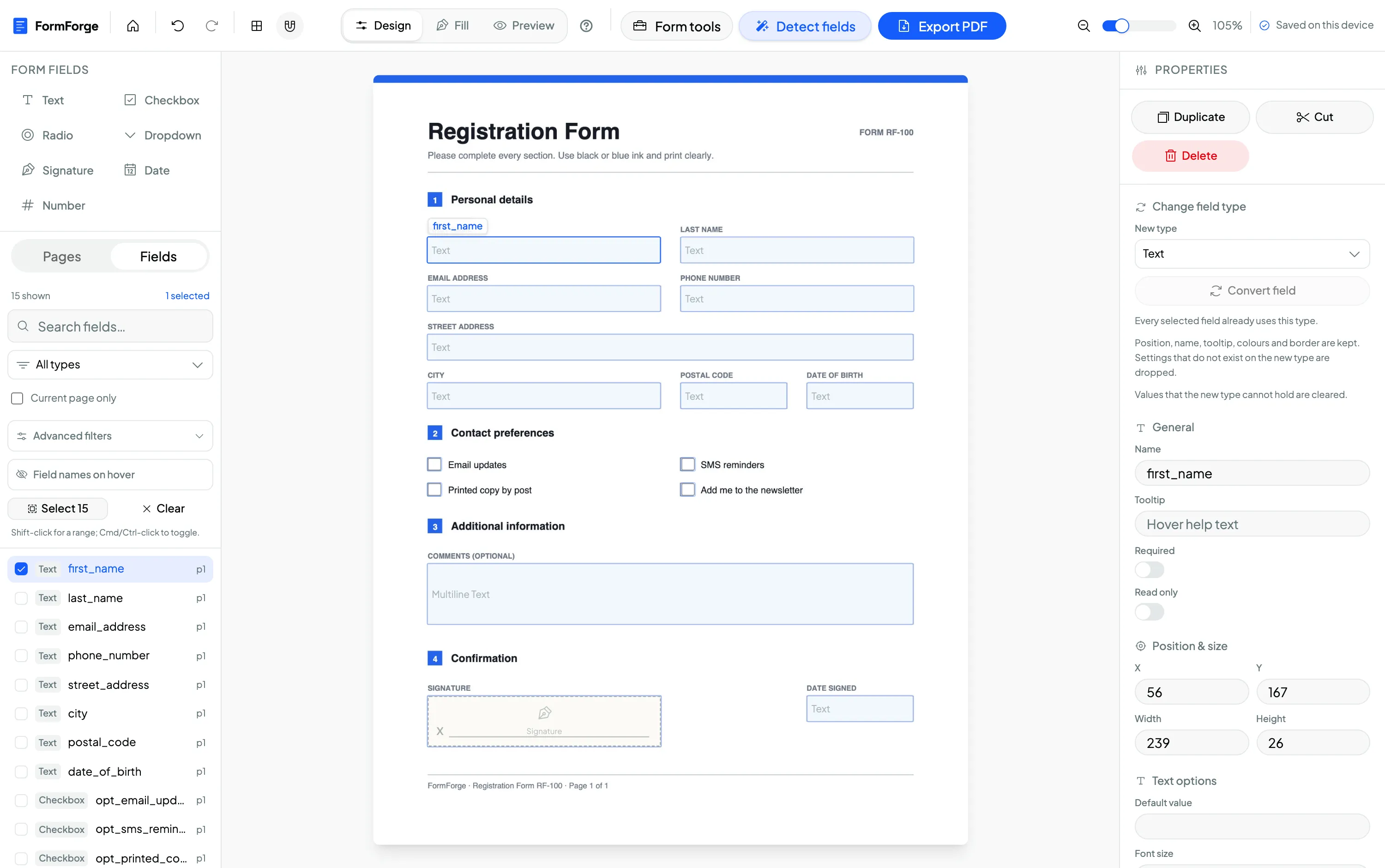
Open the PDF, click “Detect fields” and FormForge proposes the text boxes, checkboxes and signature field in one pass. Nudge anything that landed slightly off with the arrow keys — one point per tap, ten with Shift held — and export. Your designed page is untouched; only the fields are added.
How small businesses build forms with FormForge
Three everyday client-facing jobs, each done start to finish in the browser — from your own designed PDF to a form clients can fill on any device.
Turn a designed quote into a fillable order form
Import the branded PDF quote you exported from Canva, Word or InDesign and drag text and number fields onto the quantity, price and client-detail lines. Your design is untouched — it just becomes an order form clients can complete and return.
Build a client intake questionnaire
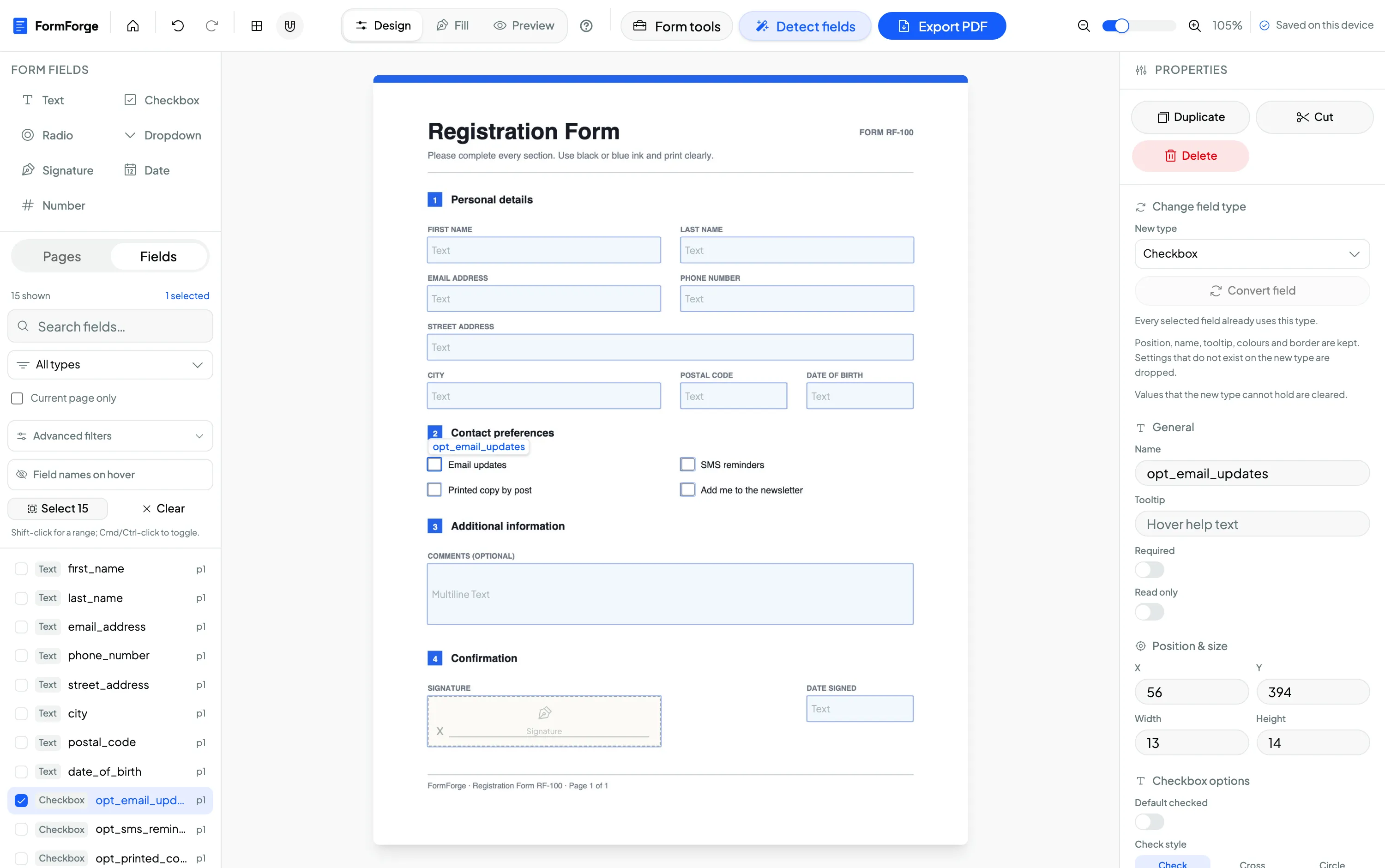
Add dropdown fields for service or package, checkboxes for the options a client wants, and text fields for their details. Name each field and mark the required ones in the properties panel so every intake form comes back complete.
Create a booking or registration form
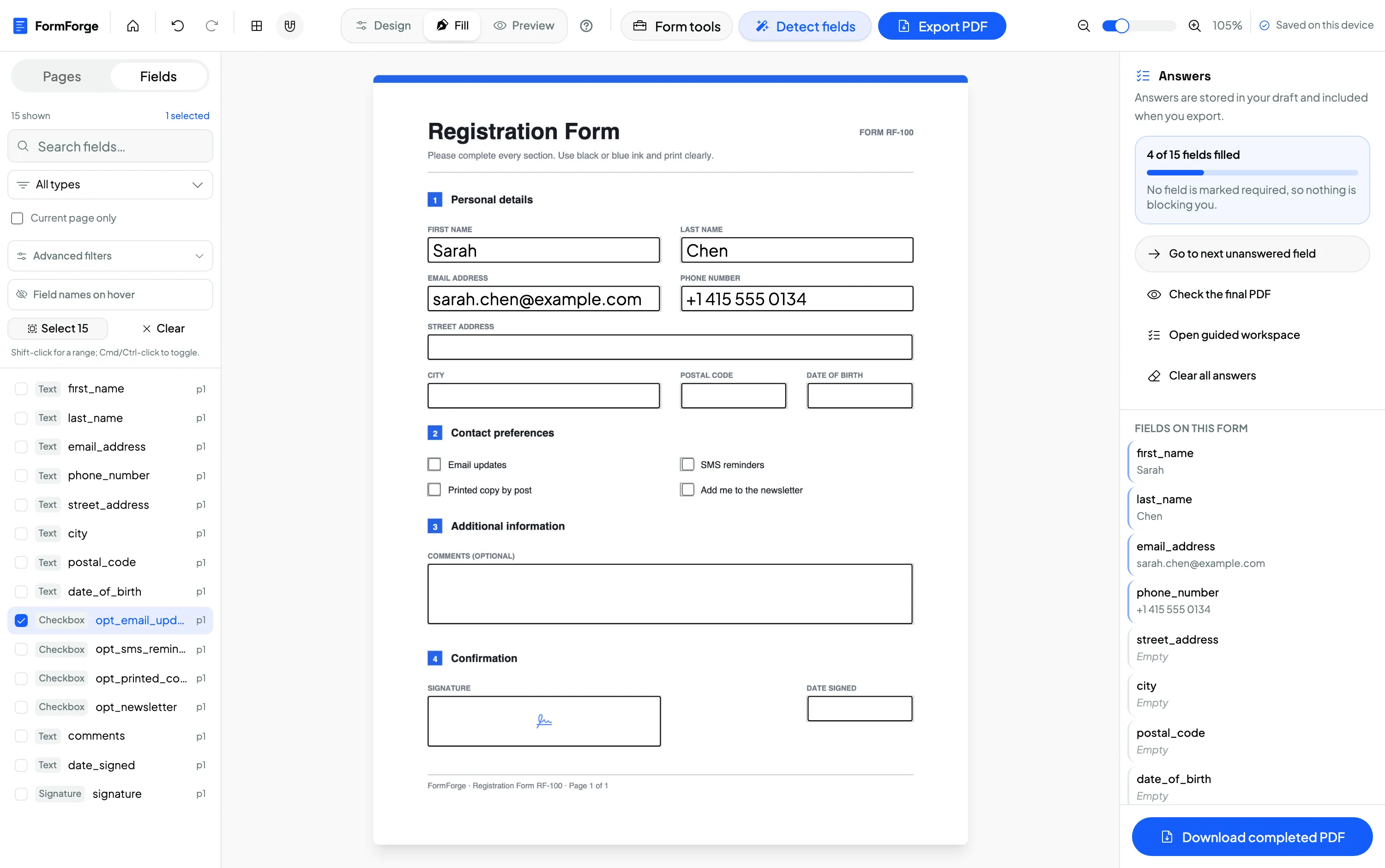
Place date fields for the appointment or event, number fields for guest count or hours, and a signature field to confirm. Preview it exactly as the client will see it, then export a standard fillable PDF.
Turn a designed invoice or waiver into a form in one pass
Import the branded PDF you exported from Canva or Word, run “Detect fields” on the page and let FormForge propose the text boxes, checkboxes and signature field. Then tidy up: drag a marquee over a row to grab several fields at once and set their width and height together, copy and paste a block onto the next page, and export the fillable PDF.
Your files and client details stay on your device
When you invoice a client or collect their details on an intake form, that paperwork holds names, addresses and pricing you would rather not hand to a third-party service. Because FormForge processes every PDF locally in your browser, nothing is uploaded — the file you build, and everything typed into it, never leaves the device. There is no account holding your documents and no vendor server in the loop, which is a genuine advantage over cloud form tools built around uploading your files.
Processed in the browser
Rendering, field editing and export all happen in the tab — no server round-trip for the file.
Nothing uploaded
Your PDFs and client details are never transmitted. You can confirm it in the browser’s network tab.
No account, no vendor lock-in
With nothing stored on a server, there is no account to manage and no data left behind if you stop.
Free to use — including for commercial work
FormForge is free to use because it runs in your browser with no servers to pay for. There is no account, no credit card and no per-seat licence, and the terms grant use for both personal and commercial purposes — so building and reusing client forms for your business is covered. We don’t promise it stays free indefinitely, but there is no cost or subscription to use it today.
- No subscription
- No account required
- Free for commercial use
- Every field type included
Questions from small businesses & freelancers
Can I use my own branded PDF as the starting point?
Do my clients need to install anything to fill the form?
Is commercial use allowed for my business?
Is there a limit on how many forms I can make?
How does this compare to Adobe Acrobat for simple forms?
What kinds of small-business forms can I make fillable?
Can I reuse a form for every client?
Do I have to place every field by hand?
Related use cases & guides
See how neighbouring teams build fillable PDFs, or read a step-by-step guide.
HR & Recruiting
Onboarding packs, applications and policy sign-offs built free and kept on your device.
Legal Professionals
Client intake, engagement letters and contracts with signature and date fields.
Make a PDF fillable without Acrobat
A free, browser-based alternative to Adobe Acrobat for adding form fields.
How to create a fillable PDF form for free
A step-by-step guide to adding fields and exporting a form — no software.
AI field detection
One click proposes the fields on a flat invoice, quote or waiver — no manual placement.
Build Your First Client Form — Free
Free to use. No subscription, no account, no uploads. A drag-and-drop PDF form builder that runs entirely in your browser — your files never leave your device.
Start Building — Free