The Free AcroForm Field Editor for Developers
Author and inspect AcroForm field definitions with exact field names, types and defaults — then export a clean, standard PDF you can fill programmatically with pdf-lib, iText, PDFBox or pdftk. Built on pdf-lib and PDF.js, running entirely in your browser. No backend, no upload, no account.
Open the Field Editor — Free- Client-side only
- Standard AcroForm output
- Built on pdf-lib + PDF.js
- No account

What is FormForge?
FormForge is a free, browser-based PDF form editor that turns any PDF into a fillable form — with no uploads, no account, and no software to install.
- Price
- Free — no account, no credit card, no sign-up
- Where files are processed
- Entirely in your browser; no PDF is ever uploaded
- Field types
- 7 — text, checkbox, radio, dropdown, signature, date, number
- Automatic field detection
- Yes — a neural network runs locally in your browser, offline once cached
- Signatures
- Draw or type as an image, plus optional certificate signing on export
- Mobile
- Full touch editor for phone and tablet
- Installable
- Yes — an installable PWA that opens PDFs from your OS
- Batch generation
- CSV/TSV mail-merge — up to 100 rows in, a ZIP of PDFs out
- Form checks
- 21 AcroForm compliance checks with one-click fixes
- Export format
- Fillable PDF (AcroForm) — opens in Adobe Reader, Preview, Chrome, Firefox
- Works offline
- Yes
- App languages
- 7 — English, German, Spanish, French, Italian, Brazilian Portuguese, Simplified Chinese
Built for the developer who fills PDFs in code
If you fill, generate or test AcroForm PDFs programmatically, the hard part is never the drawing — it is getting exact field names, types and defaults right. Here is how FormForge answers each pain, with nothing it cannot back up.
Programmatic filling breaks unless field names and types match exactly.
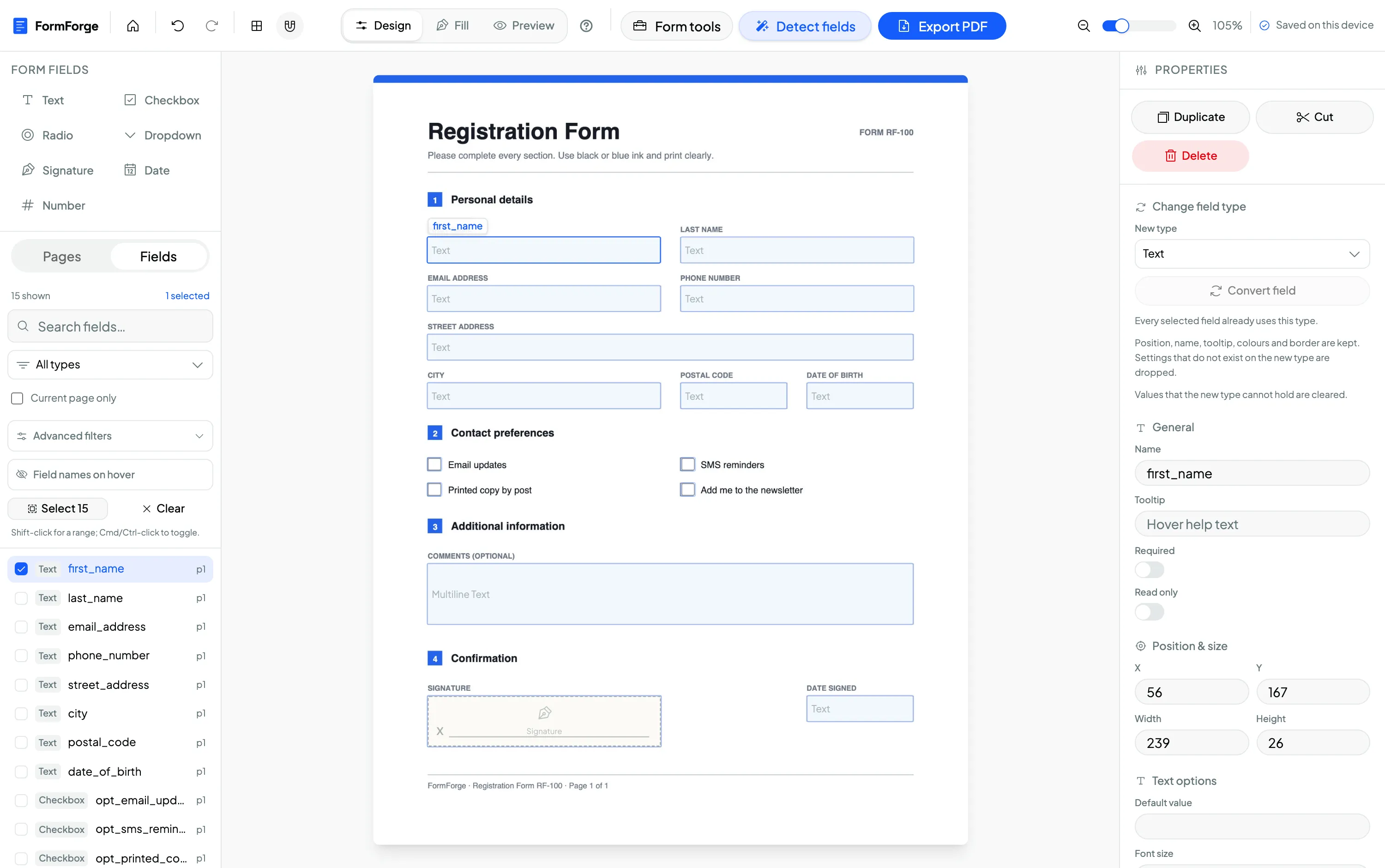
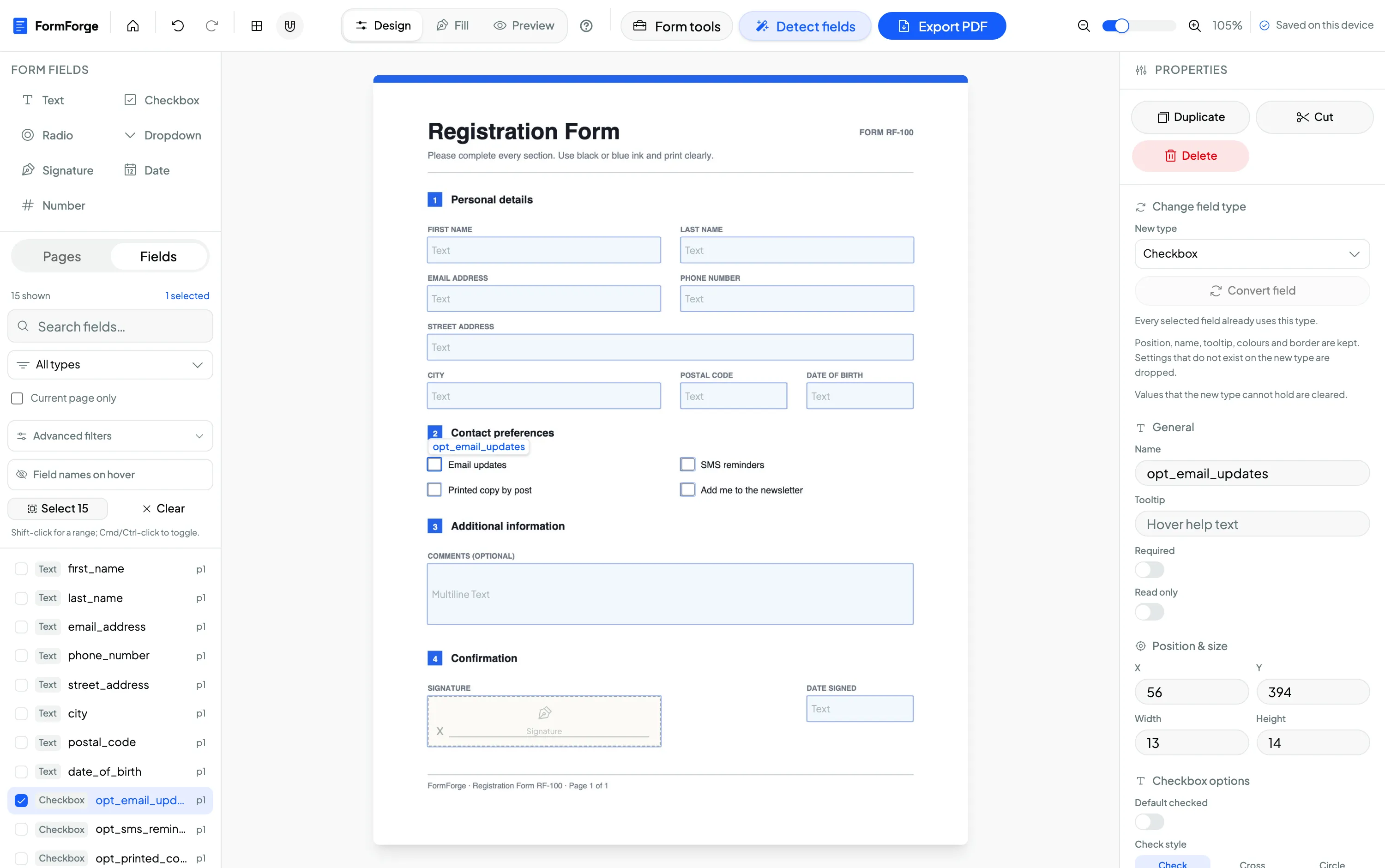
The properties panel gives you full control over each field’s name, type, default value and required flag. What you type is the exact partial field name written to the PDF — no prefixing or mangling — so your pdf-lib or PDFBox fill script targets the same string you see in the editor.
You need to inspect a third-party PDF and discover the fields it already defines.
Import any existing PDF and FormForge renders it with PDF.js and surfaces every field on the canvas, so you can read and edit each field’s name and type before writing a line of fill code against a vendor’s form.
Writing generation code just to produce one-off test fixtures is overkill.
For a single fixture, the visual editor beats a generation script: drop the fields, set the edge-case config you need, export. Reserve the code path for the fills you actually run in CI.
You don’t trust random “free PDF tools” that upload your files to a server.
FormForge is client-side only — rendering, editing and export all run in the tab, and nothing is uploaded. It is built on pdf-lib for export and PDF.js for rendering, so you can reason about exactly what it does. No account, no server in the loop.
You need a fixture with fifty fields, and you are not going to place fifty boxes by hand or stand up a service to do it.
“Detect fields” runs FFDNet in ONNX form through ONNX Runtime Web on the WebAssembly execution provider, inside a dedicated Web Worker, single-threaded and with no GPU. The weights come from FormForge’s own origin and are cached for a year, so there is still no backend in the loop. Detected fields arrive with generated names such as detected_text_p1_1, reading-order tab order and auto font size — rename what matters and batch-edit the rest.
Three workflows for developers & QA
From authoring a fixture to inspecting a vendor’s form to building nasty edge cases — each done in the browser, each producing a standard AcroForm PDF.
Field a template, then fill it with pdf-lib
Import an invoice template, drop text and number fields, and name them exactly — invoice_number, client_name, amount_due. Export the fillable PDF and read those names straight into the pdf-lib fill script below. No guessing at field names.
Import a vendor PDF to discover its field names
Open a third-party form and FormForge renders it with PDF.js and shows every field on the page. Read each field’s exact name and type before you write fill code against someone else’s AcroForm definitions.
Build edge-case test fixtures
Create the awkward cases your suite needs: a radio group with several options, a dropdown with a long option list, a required number field, a read-only default. Preview it, export, and commit the fixture to your test data.
Generate a fixture with detection, then batch-edit its properties
Run “Detect fields” over a flat PDF and you get named text, checkbox and signature fields in reading order. Select several with a marquee, with Cmd/Ctrl+A, or with shift-click range select in the field list, and the properties panel switches to batch mode: tooltip, required, read-only, border width and colour, background fill, width and height all apply across the selection as one undo step. Field name, export name and X/Y position stay per-field by design.
Fill your exported form with pdf-lib
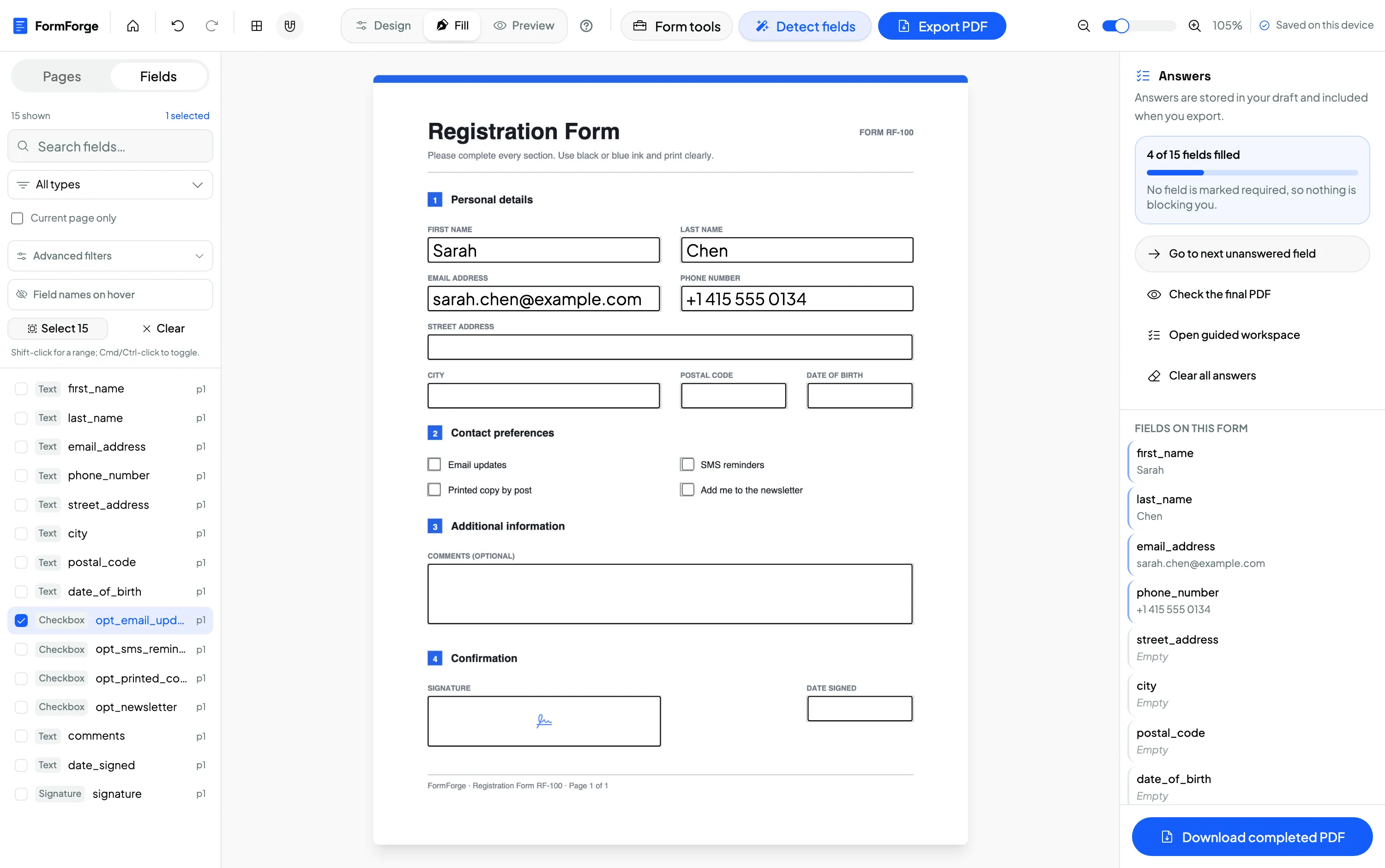
Export the form from FormForge, then target the exact field names from the properties panel. This is standard pdf-lib against a standard AcroForm — the same field names work with iText, PDFBox or pdftk.
import { readFile, writeFile } from 'node:fs/promises'
import { PDFDocument } from 'pdf-lib'

// The fillable PDF you exported from FormForge
const bytes = await readFile('invoice-form.pdf')
const pdfDoc = await PDFDocument.load(bytes)
const form = pdfDoc.getForm()

// Use the exact field names shown in FormForge's properties panel
form.getTextField('invoice_number').setText('INV-1042')
form.getTextField('client_name').setText('Acme Corp')
form.getTextField('amount_due').setText('1250.00')
form.getCheckBox('paid').check()
form.getDropdown('payment_terms').select('Net 30')

await writeFile('invoice-filled.pdf', await pdfDoc.save())
Verified: this snippet was run with pdf-lib 1.17 against a form built through FormForge’s exact export code path — all five field values round-tripped. Date and number fields are exported as standard text fields, so fill them with getTextField(name).setText(...). For a radio group use form.getRadioGroup(groupName).select(optionName).
No magic — just AcroForms, pdf-lib and PDF.js
This audience respects the stack, so here is exactly what happens. FormForge is a client-side app: your PDF is loaded into the browser, edited, and exported without ever touching a server. Everything below runs in your tab.
Standard AcroForm fields
Fields are plain AcroForm widgets — text, checkbox, radio group, dropdown, plus date/number/signature built on text fields. No XFA, no proprietary layer, so any AcroForm-aware library can read and fill the output.
Export with pdf-lib
On export, pdf-lib loads your original bytes, clears any pre-existing AcroForm, and re-creates each field via createTextField / createCheckBox / createRadioGroup / createDropdown using the exact names you set. Appearances are generated so fields render before a viewer touches them.
Rendering with PDF.js
The page you see and drop fields onto is your real PDF rasterised by Mozilla’s PDF.js. Field positions are mapped from the on-screen canvas to PDF user-space (bottom-left origin) at export time, so what you place is where it lands.
Drafts in IndexedDB
Work-in-progress is autosaved to the browser’s IndexedDB (via idb) on your device — not a server. Close the tab and your draft is still there; clear site data and it is gone. The exported PDF is the portable artefact you keep.
Your PDFs never leave the browser
Test PDFs often carry real or realistic data — customer records, internal templates, unreleased document layouts — that has no business on a third-party server. FormForge processes every PDF locally: rendering, field editing and export all run in the tab, and nothing is uploaded. There is no account holding your files and no vendor server in the loop, which you can confirm yourself in the browser’s network tab. For a tool built on pdf-lib and PDF.js, that is not a marketing claim — it is just how the app is wired.
Processed in the tab
Load, render, edit and export all happen client-side — no server round-trip for the file.
Nothing uploaded
Open the network tab and watch: your PDF bytes are never transmitted anywhere.
Open, inspectable stack
Built on pdf-lib and PDF.js — well-known libraries you can reason about, not a black box.
Free — because there is no backend to pay for
FormForge is free to use precisely because it runs entirely in your browser: there are no servers processing your files, so there is nothing to meter or bill. No account, no credit card, no per-seat licence, and every field type is included. To be straight with you — we can’t promise it stays free indefinitely, but there is no cost, quota or subscription to use it today.
- No account
- No backend to bill
- Every field type included
- No forms-per-month quota
Developer & QA questions
Can I control the exact field names?
What does it export — AcroForm or XFA?
Can I inspect the fields of an existing PDF?
Is the output compatible with pdf-lib / iText / PDFBox filling?
How do I fill a number or date field in code?
Why is it free? (the honest answer)
Where does the field detection actually run?
Related use cases & guides
See how other teams use the same editor, or read a step-by-step guide.
Small Business & Freelancers
Invoices, order forms and client intake — built free and kept on your device.
Legal Professionals
Intake, engagement letters and contracts with signature and date fields.
How to create a fillable PDF form for free
A step-by-step guide to adding fields and exporting a form — no software.
Make a PDF fillable without Acrobat
A free, browser-based alternative to Adobe Acrobat for adding form fields.
AI field detection
FFDNet in ONNX Runtime Web, on WebAssembly, in a worker — generated field names, no backend.
Author Your First AcroForm — Free
Free to use. Client-side only, no account, no uploads. Built on pdf-lib and PDF.js — drop your fields, name them exactly, and export a standard fillable PDF you can fill in code.
Open the Field Editor — Free